Best Free POS System for Restaurants & Cafés (2026)
Our Top Picks at a Glance
Skip the reading — grab the pick that matches your shop.

Right-sized for most small shops
Star Micronics TSP143IIIBi Bluetooth Thermal Receipt Printer for iOS, Android, and Windows with Auto-Cutter and Internal Power Supply - Gray

Simple, reliable, easy to set up
Rongta 80mm Thermal POS Receipt Printer with Auto Cutter
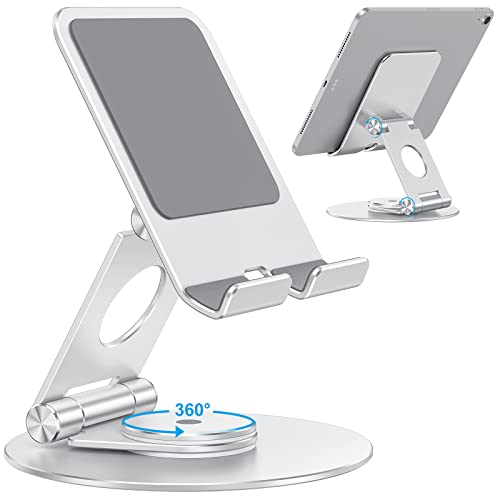
Higher-end pick when volume matters
OMOTON Swivel Tablet Stand for iPad with 360 Rotating Base, Foldable Adjustable Holder for Drawing, Compatible with iPad Pro/Air/Mini and More, Silver
As an Amazon Associate, ExpressBizTools earns from qualifying purchases at no extra cost to you.
Best Free POS System for Restaurants & Cafés (2026)
Restaurants and cafés run on the tightest margins in retail. When average net profit sits at 3–7% of revenue, a $200/month POS bill is not a rounding error — it is a full lunch shift of profit gone every single day. In 2026, a small restaurant or café does not need to pay it. Free POS software combined with off-the-shelf hardware handles ordering, kitchen tickets, receipts, inventory, and daily sales reports for a fraction of the cost of bundled systems like Toast, Square for Restaurants Plus, or Clover. Here is the honest breakdown.
Why Free POS Works for Small Restaurants
Modern free POS platforms have quietly caught up to paid restaurant systems for anything under about 80 covers a night. The three things you actually need — take orders quickly, get them to the kitchen without a game of telephone, and reconcile the drawer at close — are solved problems even at the $0 tier.
Where paid restaurant POS still wins is at high complexity: 40+ menu items with heavy modifier trees, split-check-across-six-people scenarios, tableside handhelds for a full-service dining room, or multi-location inventory that flows across a small chain. For a coffee shop, a bakery, a food truck, a taproom, a small counter-service restaurant, a ghost kitchen, or a neighborhood café, free is not just adequate — it is often better because it forces simpler menus that run faster.
The Best Free POS Options for Restaurants in 2026
1. Square for Restaurants Free. The most polished free restaurant POS on the market. Includes menu management, item modifiers, basic table layout, and kitchen printer routing. Card rates: 2.6% + 10¢ tap or chip. The catch is the free plan is genuinely usable — Square makes money on processing, not upsells. Perfect for cafés, food trucks, and small counter-service restaurants.
2. ExpressBizTools + kitchen printer setup. More flexible if you want to control your processor separately. Handles menu items, categories (breakfast, lunch, drinks), modifiers via item variants, inventory decrements on sale, and prints kitchen tickets on any second thermal printer. The trade-off: order flow is manual (ring on tablet → print to kitchen → deliver plates → close ticket). Fine for counter-service, not for a 20-table dining room.
3. Loyverse. Free tier that punches above its weight. Multi-station, kitchen display support, and open-tab management. Good for a small bar or café. Watch the upsell — advanced inventory and employee management are paid.
4. eHopper Free. Older interface but genuinely free for one register. Restaurant-specific features like table management and split checks. Rarely the best choice but a valid backup if the others do not fit.
5. Toast Starter Kit. Not truly free — the software has no monthly fee, but you have to use Toast Processing, and hardware is bundled at a markup. Include it here because most Google results push it, but it is really the "free hardware in exchange for processing" model in disguise.
Hardware Setup for a Small Restaurant
The complete stack for a small café or counter-service restaurant looks like this:
• Tablet or all-in-one POS terminal (front counter): $0–$300 depending on whether you use an existing iPad
• Ethernet or Wi-Fi thermal kitchen printer: $120–$180. Ethernet models are far more reliable than Bluetooth for kitchens. Stainless steel exterior helps in a hot line.
• Front-of-house thermal receipt printer (80mm): $90–$150
• Cash drawer, 16-inch, printer-triggered: $80
• Bluetooth chip-and-tap card reader: $29–$79
• Menu display for customers (optional customer-facing tablet): $150
A full café POS runs $500–$800 in one-time hardware. A bundled Toast/Clover setup for the same functions runs $2,500–$4,000 upfront plus $79–$165/month forever.
Kitchen Printer Setup — The Difference Between Chaos and a Working Line
The single most important hardware decision in a restaurant POS is the kitchen printer. Here is what actually matters:
• Ethernet, not Wi-Fi. Wi-Fi kitchen printers drop connections during dinner rushes. Ethernet does not. Run a cable.
• 80mm paper, not 58mm. Cooks need to read tickets across a hot line without leaning in. Bigger paper wins.
• Auto-cutter mandatory. Manual tear bars slow the ticket-hand-off ritual and destroy neat tickets.
• Sound alert. A ticket printing silently gets missed. A ticket that beeps does not.
• Grease-resistant housing. Stainless steel or heavy plastic. Not a $50 no-brand printer that will die in 90 days from griddle vapor.
Star SP742 and Epson TM-U220 are the two workhorses of the industry. Neither is glamorous. Both last a decade in a working kitchen.
Table Management vs Counter Service — Pick Your Flow
Free POS systems handle counter service beautifully. They handle table service adequately at best. Decide which flow your restaurant actually runs before choosing:
• Counter service: Customer orders at register, pays immediately, receives a number or gets called when food is ready. Every free POS on this list handles this perfectly.
• Tableside service: Server takes orders on a handheld, fires to kitchen, adds courses over 90 minutes, splits checks four ways, processes tip adjustments. This is where you may need a paid system — Toast, Square for Restaurants Plus, or TouchBistro.
The good news: about 70% of small restaurants that opened in the last three years chose counter service or hybrid formats specifically to avoid the paid POS overhead. If your concept can support counter service, free POS wins.
Menu Setup — The 80/20 Rule for Free Systems
Free restaurant POS systems can slow down if you build a menu of 200 items with dozens of modifiers. Here is how to keep it fast:
1. Limit primary menu items to 40 or fewer. Beyond 40, cashiers navigate by category, which slows every order.
2. Use modifiers, not variants. A "Latte" with size and milk modifiers is one item. A "Small Whole Milk Latte" listed alongside 11 other latte variants creates chaos.
3. Group by service period. Breakfast items in a breakfast category, dinner items in a dinner category. Hide off-hour categories to reduce cashier tap-counts.
4. Keep top sellers on the home screen. Analyze weekly. The five best sellers should be a single tap away.
Cash Handling — Underrated for Cafés
Card volume in cafés is climbing but still averages 65–75% of sales. That means the cash drawer, deposit routine, and tip jar setup still matter. Free POS on this list all support:
• Opening the drawer only when a receipt prints or a manager code is entered
• Recording paid-outs (petty cash paid to a delivery, for example)
• End-of-shift cash counts vs system-recorded cash sales
• Tip tracking allocated to specific staff (Square handles this best on the free tier)
Set up cash management on day one, not month three when you have already lost track of $400.
Compliance for Restaurants
Every US state and most countries require food service businesses to keep sales records for tax purposes. All the free POS options here produce exportable daily and monthly sales reports with tax breakdowns. If you are in a jurisdiction with fiscal receipt requirements (parts of Europe, Latin America, or specific US states) confirm your chosen POS supports that specifically before going live — it is the single most common compliance gap in free systems.
When to Upgrade From Free
Some real signals it is time to consider paid restaurant POS:
• You added a second location and need shared inventory or menu editing
• You added a full-service dining room with 15+ tables and multiple servers
• Ticket volume passed 200/day and menu complexity is slowing cashiers
• You need a kitchen display system (KDS) for a fast-paced line
• Your accountant needs deeper labor reporting than the free tier provides
Below those thresholds, free is not just fine — it is the correct choice.
Bottom Line
A small restaurant or café in 2026 can run a professional POS — full menu, kitchen ticket printing, cash drawer, card processing, sales reporting, and daily reconciliation — for $0 in monthly software fees. Square for Restaurants Free is the smoothest single-vendor option. ExpressBizTools plus your own hardware is the most flexible and processor-agnostic. Toast is the biggest name but not the best value for small formats. Save the $1,500–$2,000/year you would spend on paid POS software and put it into a better espresso machine, better ingredients, or better staff. The customer will notice.
Frequently asked questions
What is the best free POS for a small restaurant?
Square for Restaurants Free is the most polished single-vendor option. ExpressBizTools plus your own hardware is the most flexible and processor-agnostic. Loyverse is a strong middle ground for cafés and bars.
Do I need a kitchen printer for a small café?
Yes if your kitchen is out of view of the register. An Ethernet-connected 80mm thermal kitchen printer (Star SP742 or Epson TM-U220) with auto-cutter and beeper is the industry standard.
Is Toast really free?
The software is free but you must use Toast Processing, and hardware is bundled at a markup with multi-year processing contracts. It is the "free hardware for locked-in processing" model, not a truly free POS.
Ready to try ExpressBizTools?
Free to use in your browser. No account or card needed.
Get Started Free