Best Free POS System for Small Business in 2026
Our Top Picks at a Glance
Skip the reading — grab the pick that matches your shop.
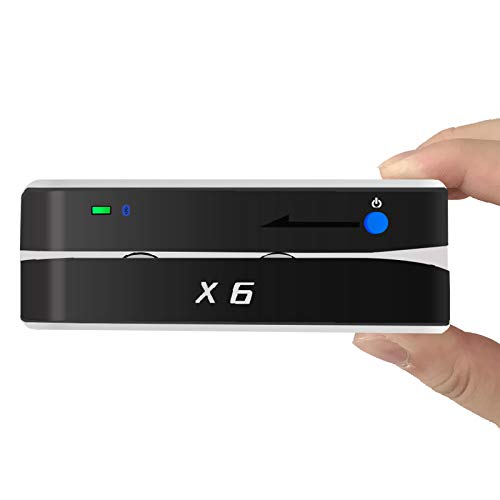
Right-sized for most small shops
Bluetooth X6BT VIP Card Reader Writer Encoder Card Swiper Scanner
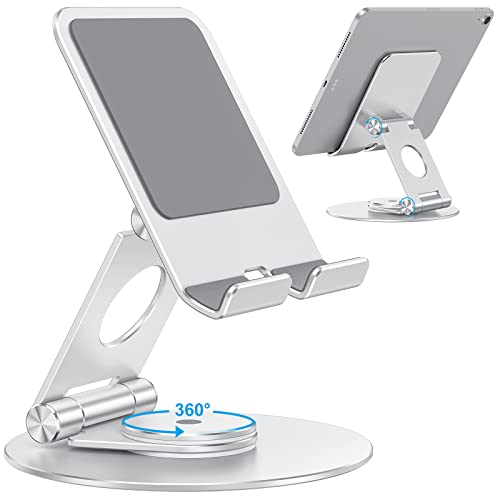
Simple, reliable, easy to set up
OMOTON Swivel Tablet Stand for iPad with 360 Rotating Base, Foldable Adjustable Holder for Drawing, Compatible with iPad Pro/Air/Mini and More, Silver

Higher-end pick when volume matters
SAM4s White GIANT-100 Compact 3" Thermal POS Printer USB Serial Ethernet, with Splash Cover Included 16" Black Cash Drawer
As an Amazon Associate, ExpressBizTools earns from qualifying purchases at no extra cost to you.
Best Free POS System for Small Business in 2026
Short answer: if you are a solo operator or a small team and want checkout, inventory, invoices and customer records in one place, a phone-based tool with a free plan — such as ExpressBizTools, which uses your phone camera as the barcode scanner and needs no special hardware — is enough. If you process 100+ card transactions a day, need a receipt printer and cash drawer wired in, or have several staff on registers at once, choose a dedicated POS and budget for its monthly plan and per-transaction card fees.
Finding a free point-of-sale (POS) system that actually works for your small business can feel impossible. Most "free" options come with hidden fees, transaction charges, or crippling limitations. Here's an honest comparison to help you choose.
What Makes a Good POS System?
Before comparing options, let's define what small businesses actually need:
1. Fast checkout — Customers shouldn't wait while you fumble with software
2. Inventory integration — Sales should automatically update stock levels
3. Invoice generation — Create receipts and invoices on the spot
4. Customer tracking — Know who's buying what and how often
5. Works on mobile — Use your phone or tablet as a POS device
6. Truly free — No hidden monthly fees or per-transaction charges
The Problem with Traditional POS Systems
Traditional POS systems like Square, Clover, and Lightspeed are powerful but expensive:
• Hardware costs — Dedicated terminals, card readers, receipt printers
• Monthly fees — $50-200/month for full-featured plans
• Transaction fees — 2.5-3.5% on every card transaction
• Lock-in — Proprietary hardware that only works with their software
• Complexity — Features designed for enterprises, not solo operators
A Simpler Approach: ExpressBizTools
For small retail shops, service businesses, and market vendors, ExpressBizTools offers a refreshing alternative:
• Use your phone as a POS — No special hardware needed
• Barcode scanning — Your phone camera becomes a barcode scanner
• Instant invoices — Create and send invoices while the customer waits
• Real-time inventory — Every sale updates stock automatically
• Customer profiles — Build relationships, not just transactions
• Free plan available — No credit card, no trial period
When Do You Need a Dedicated POS vs. an All-in-One Tool?
Choose a dedicated POS if:
• You process 100+ card transactions daily
• You need hardware integration (receipt printer, cash drawer)
• You have multiple employees using registers simultaneously
Choose an all-in-one tool like ExpressBizTools if:
• You're a solo operator or small team
• You need inventory management alongside sales
• You want invoicing, CRM, and analytics in one place
• You want to start free and scale up as needed
Getting Started
The beauty of a mobile-first tool is that you can start right now:
1. Sign up free at ExpressBizTools
2. Add your products (or import via CSV)
3. Start scanning barcodes and creating invoices
4. Track everything from your phone
No hardware to buy. No contracts to sign. Just better business management from day one.
Frequently asked questions
What is the best free POS system for a small business?
For a solo operator or small team, a phone-based all-in-one tool with a free plan, such as ExpressBizTools, covers checkout, inventory, invoices and customer records with no hardware to buy. A business taking 100+ card transactions a day, or needing a receipt printer, cash drawer and several registers, is better served by a dedicated POS.
Do I need special hardware to run a POS?
Not with a mobile-first tool: your phone camera works as the barcode scanner and invoices are sent from the phone. Dedicated POS systems usually add terminals, card readers and receipt printers.
When should a small business choose a dedicated POS instead?
When it processes 100 or more card transactions a day, needs hardware such as a receipt printer and cash drawer integrated, or has several employees using registers at the same time.
Ready to try ExpressBizTools?
Free to use in your browser. No account or card needed.
Get Started Free