Best POS System With No Monthly Fee (2026 Buyer's Guide)
Our Top Picks at a Glance
Skip the reading — grab the pick that matches your shop.

Right-sized for most small shops
SAM4s White GIANT-100 Compact 3" Thermal POS Printer USB Serial Ethernet, with Splash Cover Included 16" Black Cash Drawer
Simple, reliable, easy to set up
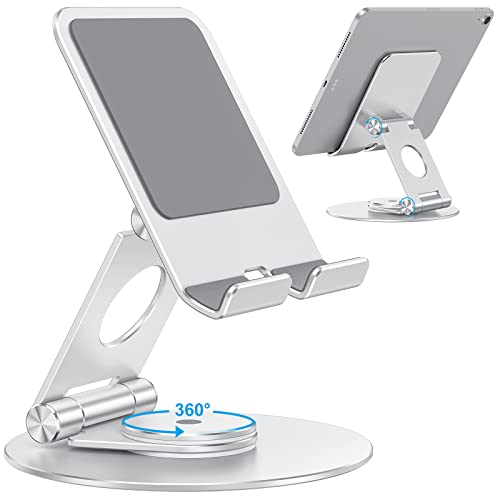
OMOTON Swivel Tablet Stand for iPad with 360 Rotating Base, Foldable Adjustable Holder for Drawing, Compatible with iPad Pro/Air/Mini and More, Silver

Higher-end pick when volume matters
Tera Cash Register Drawer 16 inch: 5 Bill 8 Coin Media Slot for POS, 415A
As an Amazon Associate, ExpressBizTools earns from qualifying purchases at no extra cost to you.
Best POS System With No Monthly Fee (2026 Buyer's Guide)
If you are opening a small shop, running a food truck, launching a booth at a weekend market, or just tired of watching $79 leave your bank account every month for POS software you barely use, this guide is for you. A monthly fee is not a law of nature. Plenty of small businesses in 2026 run a full, professional checkout — barcode scans, receipts, cash drawer, card payments, inventory, customer profiles, tax reports — without paying a single dollar per month for software. Here is exactly how, which no-monthly-fee options are worth using, and where the hidden costs actually hide.
Why POS Companies Push Monthly Fees So Hard
POS software companies love monthly fees because they are predictable revenue. They love multi-year merchant services contracts even more because the processor rebates fund the sales team. That is fine for the vendor — it is not fine for a small shop grossing $8,000 a month, where a $79 monthly software fee plus $30 in "gateway fees" plus $15 in "PCI compliance" plus $12 in "statement fees" eats a real chunk of profit before you ring up your first sale of the month.
The truth: the software side of a modern point-of-sale is not expensive to build or run. Free tools like ExpressBizTools handle every checkout function most small shops need. What you pay for on top is either processing (card fees, always variable) or hardware (buy once, use for years). Any monthly software fee on top of those is a legacy pricing model most small businesses no longer need to accept.
What "No Monthly Fee" Actually Means
Before you shop, understand the three flavors of "free" you will encounter:
1. Truly free software, pay-per-transaction processing. Square Free, PayPal Zettle, Stripe Terminal, and ExpressBizTools all fit here. You pay only when you take a card. No card taken, no fee. This is what most small shops actually want.
2. Free tier with painful upsells. Some POS vendors offer a "free" plan that locks anything useful — inventory over 20 items, reporting, multiple staff logins — behind a paid upgrade. Free for a demo, useless for a real shop.
3. Free hardware with a locked-in processor. Vendor gives you a "free" terminal in exchange for a 3-year processing contract at 3.5% + $0.15 per transaction. There is no such thing as free hardware — you paid for it in processing fees, usually 2x over.
Focus on option one. Anything else is a monthly fee wearing a costume.
The 5 Best No-Monthly-Fee POS Options in 2026
1. ExpressBizTools (our own app) + off-the-shelf hardware. The most flexible setup. Free software handles inventory, invoicing, receipts, customers, and reports. You pair it with any USB barcode scanner, any ESC/POS thermal receipt printer, any RJ11 cash drawer, and any Bluetooth chip-and-tap card reader you like. No processor lock-in, no fees, no contract. The trade-off: card processing happens in a separate card reader app (Stripe, Square, PayPal), then you log the paid amount in ExpressBizTools. Not seamless, but genuinely $0/month.
2. Square Free. The most polished single-vendor "free" experience. Free software, free reader for one card reader, 2.6% + 10¢ per tap or chip. Excellent for physical-first businesses. The catch: you are locked into Square as your processor forever. Their rates are transparent and fair, but if you ever want to negotiate rates or switch, the hardware becomes useless.
3. PayPal Zettle. Free app, cheap reader ($29 in 2026), and 2.29% + 9¢ per in-person card. If you already have a PayPal business account, Zettle is essentially free money that also happens to run a checkout. Weak on inventory depth compared to Square but strong on international support.
4. Stripe Terminal. For businesses that already use Stripe online. Free Stripe dashboard, hardware you buy once, 2.7% + 5¢ per in-person tap. The developer-friendliest option — perfect if you want to embed the terminal inside a custom checkout flow.
5. SumUp / Shopify POS Lite. Both are valid — SumUp for zero-monthly-fee international users, Shopify POS Lite is technically free if you already pay for Shopify. Skip Shopify POS Lite if you do not also run a Shopify online store, because the $29/month subscription reintroduces the monthly fee you were trying to avoid.
What Hardware You Actually Need (And What You Do Not)
The most common mistake in a no-monthly-fee POS build is over-buying hardware because a vendor's website made it look like you need $2,000 of gear. You do not. A complete professional counter runs on:
• A tablet, phone, or laptop you already own — $0
• Thermal receipt printer, 80mm USB or Bluetooth — around $100
• Cash drawer, 16-inch, RJ11-triggered by the printer — around $80
• USB or 2.4GHz wireless barcode scanner (1D is fine unless you do QR payments) — $25–$50
• Bluetooth chip-and-tap card reader — $29–$79 depending on brand
• Receipt paper and label stock starter pack — around $30
That is roughly $270–$350 in one-time hardware. Add a tablet stand and a spare receipt roll drawer and you are still under $500. The same setup billed by a bundled POS vendor with monthly software fees costs $1,500–$3,000 upfront and $79/month forever.
Where People Go Wrong
Buying proprietary hardware for a proprietary system. A Clover terminal, Toast handheld, or Lightspeed bundle looks great in the demo. Then you decide to switch processors two years later and discover the hardware bricks. Free-and-open hardware (Star, Epson, Zebra, generic USB scanners) works with any software forever.
Skipping the receipt printer to save $100. Every small shop that skipped a receipt printer ends up buying one within six months. Customers want receipts, tax authorities require them, and returns without them are a nightmare. Just buy the printer.
Choosing the cheapest cash drawer. A $40 no-brand cash drawer will fail within a year of daily use. A $80 APG or MMF drawer lasts a decade. This is one place to spend the real money.
Ignoring offline mode. Every serious POS should keep ringing sales when the internet drops. Test yours by unplugging the router and trying to make a sale. If it freezes, keep shopping.
The Real Cost of "Free" — Card Processing Explained
Even with $0/month software, you still pay for card processing. Here are 2026 typical rates for small businesses on no-contract, no-monthly-fee processors:
• Tap or chip in person: 2.29% – 2.9% + $0.05–$0.15
• Card keyed in manually: 3.4% – 3.6% + $0.15
• Online invoice paid by card: 2.9% + $0.30
• ACH / bank transfer: 0.8% or a flat $1–$5 per transaction
On a typical $8,000/month card volume, expect $200–$250 in total processing fees. That is the same across nearly every no-monthly-fee processor — the "savings" between them at this volume are usually less than $30/month. Do not obsess over 0.1% rate differences; obsess over avoiding monthly software fees and long processing contracts.
The Monthly-Fee Trap in Disguise: "Gateway Fees"
Watch for these line items on any processor's statement:
• PCI compliance fee — $10–$30/month for something the processor legally has to do anyway
• Statement fee — $5–$15/month for producing your own statement
• Gateway fee — $10–$25/month for accepting cards, on top of the per-transaction fee
• Batch fee — $0.10–$0.25 every time you close out the day
None of these are on Square, Zettle, Stripe, or SumUp. They are almost always on Clover, First Data, Elavon, TSYS, Global Payments, and any processor that sells through a merchant-services rep. If you see any of these on a proposal, either negotiate them to $0 in writing or walk away.
Setup Walkthrough — From Zero to Ringing Sales in 90 Minutes
Here is the exact order to set up a no-monthly-fee POS from scratch:
1. Create a free ExpressBizTools account. Add your business name, tax rate, and receipt logo. 10 minutes.
2. Import inventory. Either add items one by one or upload a CSV export from your old system. 20 minutes for 100 SKUs.
3. Plug in the receipt printer and test print. Any ESC/POS printer works out of the box on modern browsers and mobile apps. 10 minutes.
4. Connect the cash drawer to the printer's RJ11 port. Test that a receipt triggers the drawer to open. 10 minutes.
5. Pair the barcode scanner. Plug in USB or pair Bluetooth. Scan an item to confirm it looks up in inventory. 10 minutes.
6. Sign up for a card processor. Square is the fastest — approved usually the same day for a US small business. 20 minutes.
7. Test-ring a $1 sale end to end. Scan an item, add tax, tender card, verify the receipt prints and cash drawer opens. 10 minutes.
Total: about 90 minutes and $0 in recurring software fees.
When You Actually Should Pay for POS Software
There are cases where a monthly fee is worth it:
• Multi-location chain with 5+ stores. You need central inventory and reporting that free tools cannot handle at that scale.
• Restaurant with a KDS, table management, split checks, and 20+ menu modifiers. Restaurant-specific POS (Toast, Square for Restaurants Plus) earns its fee here.
• Regulated industries (cannabis, alcohol, firearms) where compliance reporting is non-optional.
For a single-location small shop, none of these apply.
Bottom Line
You do not need to pay a monthly software fee to run a professional point-of-sale in 2026. Free tools like ExpressBizTools plus $300 of off-the-shelf hardware and a no-monthly-fee card processor handle every function a busy small shop needs. The vendors who insist otherwise have a subscription plan to sell you. Buy hardware once, pay only for card processing, and put the $948/year you would have spent on software fees straight into inventory, marketing, or your own pocket.
Frequently asked questions
Is there really a POS system with no monthly fee?
Yes. Square Free, PayPal Zettle, Stripe Terminal, SumUp, and ExpressBizTools all charge $0/month for the software. You only pay card processing (2.29%–2.9%) when you actually take a card.
What is the cheapest no-monthly-fee POS setup?
ExpressBizTools (free software) + a $100 thermal receipt printer + $80 cash drawer + $30 USB barcode scanner + $29–$79 Bluetooth chip-and-tap reader. Roughly $250 in one-time hardware and $0/month forever.
What is the catch with "free" POS?
Two catches to avoid: free tiers that lock real features behind upgrades, and "free hardware" that ties you to a 3-year processing contract at inflated rates. Truly free POS charges only per transaction.
Which processor offers free hardware and no setup fees?
Square, SumUp, PayPal Zettle and Stripe charge no setup fee and no monthly software fee, but you normally buy their card readers. "Free terminal" offers usually come from merchant-services resellers and are paid back through a multi-year contract, a lease or higher processing rates — read the agreement for early-termination and equipment fees before signing.
Can I use no-monthly-fee POS for a restaurant?
Yes for counter service, cafés, food trucks, and bakeries. For full-service dining rooms with tableside orders and split checks, paid restaurant POS is usually still worth the fee.
Ready to try ExpressBizTools?
Free to use in your browser. No account or card needed.
Get Started Free