Best Way to Accept Credit Cards for a Small Business (2026)
Our Top Picks at a Glance
Skip the reading — grab the pick that matches your shop.

Right-sized for most small shops
Square Terminal - Credit Card Machine to Accept All Payments | Mobile POS
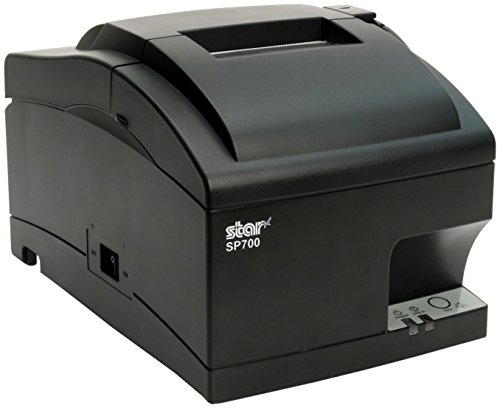
Simple, reliable, easy to set up
Star Micronics SP742ME Ethernet (LAN) Impact Receipt Printer
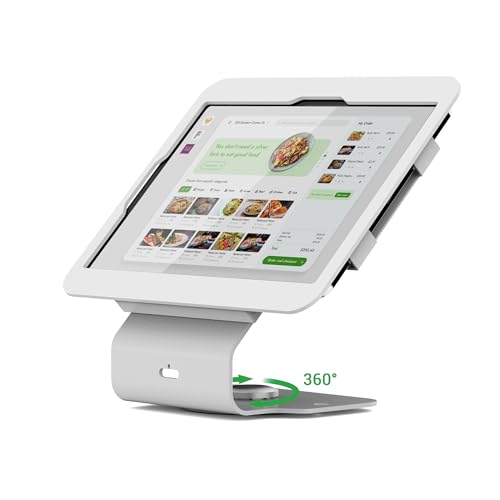
Higher-end pick when volume matters
Pinikox Kiosk POS Tablet Stand Compatible with iPad 10 gen 10.9 inch, 11"(A16), air 4 5 10.9", Pro 11" 1st 2nd 3rd 4th gen., iPad air 11", Retail Stand with 360° Swivel Base, White, BSC101WS
As an Amazon Associate, ExpressBizTools earns from qualifying purchases at no extra cost to you.
Best Way to Accept Credit Cards for a Small Business (2026)
Nine out of ten small business owners overpay to accept credit cards. Not because they are bad at business — because the payment processing industry deliberately makes pricing confusing. This guide breaks down the actual cheapest, simplest ways to accept card payments in 2026, whether you are a food truck, a home service contractor, a boutique retailer, an online seller, or a solo consultant sending invoices. No filler, no vendor spin.
The Only Three Numbers That Matter
Every credit card processor charges you three ways: a percentage, a per-transaction fee, and optional monthly fees. Ignore everything else in the sales pitch. If you know these three numbers, you know the true cost:
• Rate: typically 2.29% – 3.5%
• Per-transaction fee: typically $0.05 – $0.30
• Monthly fees: should be $0 for a small business under $50k/month volume
Anything a processor bundles into "gateway", "PCI compliance", "statement", "batch", "regulatory", or "annual" fees is monthly cost by another name. Add it up.
The 5 Best Ways to Accept Credit Cards in 2026
1. Bluetooth chip-and-tap reader + free POS software. The gold standard for physical small business. Buy a Square Reader, PayPal Zettle, or SumUp reader for $29–$79. Pair with any free POS software (Square Free, ExpressBizTools, PayPal Zettle app). Accept tap, chip, and swipe. Rates: 2.6% + 10¢ (Square), 2.29% + 9¢ (Zettle), 2.6% flat (SumUp). No monthly fees. Perfect for shops, food trucks, salons, and in-person services.
2. Tap-to-Pay on iPhone or Android. Accept contactless card, Apple Pay, and Google Pay taps directly on your phone with no hardware. Available through Stripe Tap to Pay, Square, PayPal Zettle, and Shopify. Same rates as a Bluetooth reader (2.6% – 2.9%). Zero upfront cost. Ideal for delivery drivers, home service contractors, tutors, and pop-up sellers who want zero hardware.
3. Online payment link or hosted checkout. For remote invoicing. Stripe Payment Links, Square Invoices, PayPal Invoicing, and QuickBooks Payments all let you send a customer a link that opens a hosted checkout. Rates: 2.9% + 30¢ typical. Perfect for freelancers, service businesses, and anyone who invoices work performed off-site.
4. Embedded checkout on your website. For product sellers with an online store. Shopify, WooCommerce + Stripe, and BigCommerce all give you an embedded card form. Same 2.9% + 30¢ typical rates. Look at monthly platform fees separately — a $29/month Shopify plan is not "free" processing even if it says so.
5. ACH / bank transfer for large or recurring invoices. For B2B or high-ticket invoicing. Stripe, Plaid, and QuickBooks all support ACH pulls at 0.8% capped at $5 per transaction. On a $2,000 invoice, ACH costs $5 vs $58 on a card. Ask B2B customers to pay this way and both sides win.
What to Avoid — The "Free Terminal" Trap
The most expensive mistake small businesses make is accepting a "free" terminal from a merchant services rep. Here is how the pitch works:
The rep offers you a shiny Clover, Dejavoo, or PAX terminal at no upfront cost. You sign a 3-year processing contract at 2.7% + $0.15 with an "annual fee" of $99, a "monthly compliance fee" of $19.95, and a "gateway fee" of $15. On $8,000/month card volume, you pay:
• Processing: $232/mo (about the same as Square)
• Monthly bundled fees: $50/mo
• Annual fee amortized: $8.25/mo
• Total: $290/mo vs $232/mo on Square with no contract
You "saved" $250 upfront on the terminal in exchange for $2,088 in extra fees over three years. That is what free terminals actually cost.
Understanding Interchange, Assessment, and Markup
The number you pay to a processor is broken into three parts:
• Interchange — Paid to the card-issuing bank. Set by Visa/Mastercard/Amex/Discover. Same for every processor. Ranges roughly 1.15% to 2.4% + $0.05 depending on card type.
• Assessment — Paid to Visa/Mastercard/etc. Also universal. Around 0.14%.
• Processor markup — The processor's own profit. This is the only piece that varies.
Flat-rate processors (Square, Zettle, Stripe) hide all three inside a single number like 2.6% + 10¢. Simple, easy, honest for small volumes.
Interchange-plus processors (Stax, Payment Depot, some banks) itemize each part and add a fixed markup (e.g. "interchange + 0.3% + $0.10"). These are cheaper only above about $25,000/month in card volume. Below that, flat-rate wins on both cost and simplicity.
For Small Business Under $20k/Month Card Volume
Just use flat-rate. Full stop. You will save more time and stress than you would save in fees on any other pricing model, and the total dollar difference is small. Pick one of:
• Square — most polished, easiest onboarding
• PayPal Zettle — lowest rate if under $10k/month, includes PayPal balance
• Stripe — most developer-friendly, best for online plus in-person
• SumUp — best international support, cheapest hardware
Any of these paired with ExpressBizTools for invoicing and inventory gives you a complete business stack with zero recurring software cost.
For Small Business Over $20k/Month
At $20k+ monthly card volume, it becomes worth pricing an interchange-plus processor. Get written quotes from:
• Payment Depot — subscription-plus-interchange (usually $79/mo + true interchange + 0.05%)
• Stax — similar model
• Your bank's merchant services — often surprisingly competitive if you already do business banking there
Always request a fee schedule listing every possible line item, sign nothing longer than 12 months, and demand a rate-lock or price-protection clause.
Special Situations
High-ticket B2B invoicing: Push ACH. On invoices over $500, ACH pays for itself immediately.
International sales: Stripe and PayPal handle this best. Watch for currency conversion markups (typically 1–2% on top of the base rate).
High-risk industries (adult, cannabis, firearms, nutraceuticals, ticketing): You will pay higher rates (3.5%+) at specialty processors like Authorize.net, PaymentCloud, or Durango. No point trying to hide the industry — the processor will find out and freeze the account.
Recurring subscriptions: Stripe Billing or Square Subscriptions. Both handle failed cards, retries, and dunning without extra fees.
Reducing Your Effective Rate Without Switching Processors
Three tactics that lower fees without changing anything:
1. Encourage tap/chip over keyed entry. Keyed-in cards cost 3.4%+, tap/chip cost 2.6%. Just presenting the reader clearly cuts your average rate.
2. Add a small cash discount, not a card surcharge. "3% cash discount" is legal everywhere. "3% card surcharge" is restricted in some states. Same effect on your bottom line, different legal wrapper.
3. Batch daily, not weekly. Some processors charge higher rates on delayed batches. Close out every night.
Compliance Reality — What PCI Actually Requires
If you accept cards, you are subject to PCI DSS. For a small business using a hosted processor like Square, Zettle, or Stripe, compliance is almost entirely handled for you — you complete a short self-assessment questionnaire (SAQ A) once a year. It takes about 15 minutes. Any processor charging you $19/month for "PCI compliance" is charging for a task their platform already does automatically. Ask them to itemize what the fee covers. Silence usually follows.
Setting Up Card Payments — The 30-Minute Version
1. Sign up for a free processor account (Square, Zettle, or Stripe). 10 min.
2. Provide business tax ID, bank routing info, and ID verification. 10 min.
3. Order the reader or activate Tap-to-Pay on phone. 5 min.
4. Test a $1 charge and confirm it lands in your bank in 1–2 business days. 5 min.
That is it. You are set up to accept cards for the rest of your life with no monthly fees.
Bottom Line
For 95% of small businesses in 2026, the best way to accept credit cards is a free flat-rate processor (Square, Zettle, Stripe, or SumUp) with a $29–$79 Bluetooth reader or Tap-to-Pay on your phone. Skip merchant services reps, skip "free terminal" offers, skip anything with a 3-year contract. Pair it with free software like ExpressBizTools for invoicing and inventory, and your total recurring cost is $0/month plus card-processing percentage. That is the setup thousands of successful small businesses actually use.
Frequently asked questions
What is the cheapest way to accept credit cards for a small business?
A flat-rate processor (Square, PayPal Zettle, Stripe, or SumUp) with a $29–$79 Bluetooth chip-and-tap reader or Tap-to-Pay on your phone. No monthly fees, no contract, 2.29%–2.9% per card.
Should I take a free credit card terminal from a merchant services rep?
Almost never. "Free" terminals come with 3-year contracts that add $50+/month in bundled fees. Over 3 years you typically pay $2,000+ more than a $79 Square Reader with no contract.
When is interchange-plus pricing better than flat rate?
Roughly above $25,000/month in card volume. Below that, flat-rate processors (Square, Zettle, Stripe) are cheaper after monthly fees and simpler to manage.
Do I need to pay for PCI compliance?
No. Modern hosted processors (Square, Stripe, Zettle) handle PCI compliance for you. If a processor charges $19/month for "PCI compliance", ask them to itemize what the fee covers.
Ready to try ExpressBizTools?
Free to use in your browser. No account or card needed.
Get Started Free